3D Aquarium Live Wallpaper
- 4.6
- Rating
- 1.00M
- Installs
- Free
- Price
 Analysis by App-foxy
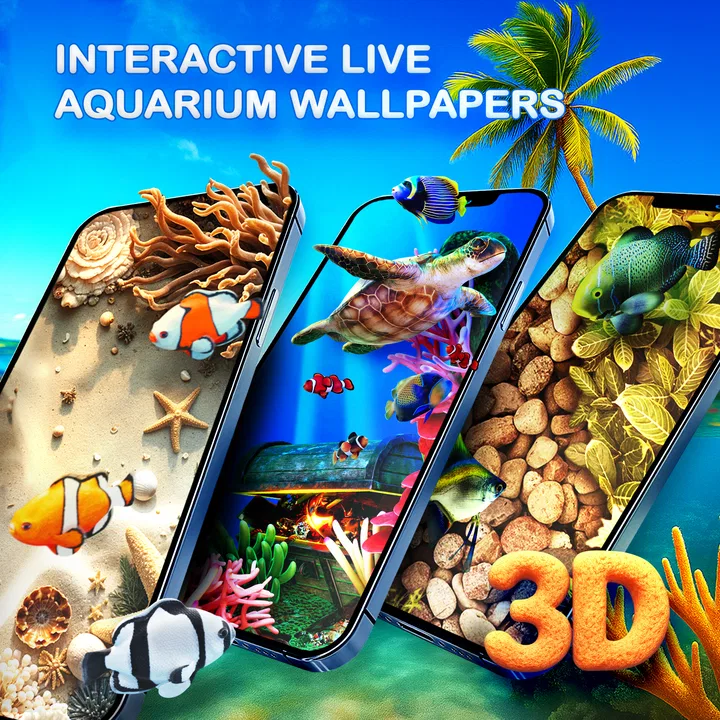
I usually think of live wallpapers as a quick novelty: attractive for a few minutes, then easy to forget. 3D Aquarium Live Wallpaper made a better first impression because it treats the phone background as a small, calming scene rather than a static picture. The aquarium theme gives the screen movement and depth, while the matching keyboard extends the same idea into something I use more often than the home screen.
This is a free personalization app from Live Wallpapers by Wave Studio, aimed at anyone who wants a more playful phone without changing the whole launcher or installing a complicated theme system. It is suitable for Everyone, works from Android 5.0 onward, and has reached over a million installs. Those details make it feel accessible rather than aimed only at people with recent flagship phones.
My overall impression is positive, but it is not a universal recommendation. If you enjoy animated backgrounds and coordinated visual details, the aquarium concept is easy to like. If you prefer maximum battery life, a distraction-free screen, or a very clean professional appearance, a still wallpaper remains the smarter choice.
You May Also Like

 Blood Strike: 2.5 Anniversary
Blood Strike’s Loadouts Turn Every Drop Into a Tactical Gamble
A close look at Blood Strike’s custom loadouts: how fast access to signature weapons reshapes its battle royale rhythm, rewards preparation, and narrows the gap between fights.

 Pandora - Music & Podcasts
Pandora’s Music Is Easy to Start, but Harder to Recover
Pandora’s strength is its low-effort path from a seed to a station. Its weak spot is how much confidence it asks you to place in connection, setup, and quiet recovery.

 8 Ball Pool
 Is Built on Rivalries, Rematches, and Routine
A close look at the rivalries, rematches, shared routines, and unanswered safety questions that turn a quick pool match into a persistent mobile community.

 Samsung Music
’s Quiet Strength Is Playing What You Already Own
Its reach comes less from spectacle than from dependable access to a personal library. That simplicity is both the app’s strongest retention engine and its ceiling.

 AccuWeather: Weather Radar
AccuWeather Review: A Quick, Clear Forecast for Everyday Decisions
For everyday plans, the best forecast is the one you can understand quickly. AccuWeather makes rain timing, radar, and local conditions easy to act on, with a few trade-offs.

 Hill Climb Racing
Why Hill Climb Racing Still Turns Crashes Into One More Run
A tiny car, a bumpy hill and one more upgrade: Hill Climb Racing keeps resurfacing because its simple chaos makes every near-miss feel personal.
More From Our News Desk



How the aquarium experience feels in everyday use
The main appeal is the sense of a living scene behind the icons. Instead of looking at a single image every time I unlock the phone, I get an aquarium-inspired backdrop with a three-dimensional look. That difference is subtle, but it changes the mood of the device. The screen feels softer and less ordinary, particularly during short moments such as checking the time, reading a notification, or opening an app.
The matching keyboard is an important part of the package. A wallpaper alone only appears in limited moments, while the keyboard can be visible whenever I write a message, search for something, or enter a note. That makes the theme feel more complete than a wallpaper downloaded in isolation. It also gives the app a practical reason to stay installed after the initial novelty has faded.
I found the aquarium style especially suitable for a personal phone used at home, during breaks, or in the evening. It has a relaxed visual character that works well when I want the device to feel less rigid. The same look may be less suitable in a workplace setting, particularly if I regularly show my screen to other people or prefer understated design.
The experience is best understood as a mood and personalization choice, not a productivity tool. It will not organize the home screen, improve typing speed by itself, or replace a full launcher. Its job is narrower: make the background and keyboard more visually expressive. Within that role, the concept is clear and consistent.
Setting it up without overcomplicating the phone
One advantage of this kind of app is that it does not require me to rebuild the entire phone interface. I can approach it as a visual layer: choose the aquarium look, apply the wallpaper, and decide whether the keyboard style belongs in my everyday setup. That makes it easier to try than a large theme package that changes icons, menus, widgets, and navigation at once.
I recommend testing the wallpaper first before committing to the keyboard. The background can be appealing while the keyboard may not suit someone who types heavily or needs a very familiar visual layout. Separating those decisions is a useful way to get value from the app without feeling that the whole phone has to follow one theme.
It is also worth checking the result with the icons and widgets already on the phone. Animated aquarium imagery can look attractive behind a sparse home screen, but a busy arrangement may reduce the visual impact or make labels harder to notice. Moving a widget or removing an unnecessary shortcut can sometimes improve the result more than changing the wallpaper again.
For users who keep several home-screen pages, the effect may be strongest on the main page and less important elsewhere. I would treat the aquarium as part of the first-screen atmosphere rather than expecting it to transform every part of the device. This is a small but useful distinction: the app can refresh the phone’s identity without needing to control every screen.
What the current release says about the app’s direction
The current version is 5.28.8, which suggests a product that has moved beyond a one-off experiment and is being maintained as an established personalization app. I would not interpret a version number alone as proof of a particular feature or performance improvement, but it does give some context: this is not presented as an abandoned concept that appeared once and disappeared.
The app was released on February 12, 2024, and its current position is reinforced by a 4.7 average from around 65 thousand ratings, along with about a thousand written reviews. I see that as a useful sign of broad appeal, although ratings cannot tell me whether the app suits my own tolerance for animation, keyboard styling, or background activity.
Its evolution is most visible in the way the aquarium idea covers two connected parts of the phone. A basic live-wallpaper app would stop at the home screen. Here, the inclusion of a live aquarium keyboard gives the theme a wider daily presence. That is the product decision that separates it from a simple animated image and explains why someone might keep using it after the first installation.
At the same time, I would avoid reading too much into the release history. The confirmed facts establish the release date and current version, but they do not justify assuming a particular changelog, new animation set, or technical overhaul. For a careful buyer, the sensible conclusion is that the app is active in its current form, while future changes should be judged by what actually appears in each update.
How existing users are likely to experience the update path
Someone already using an earlier version should mainly think about continuity. The aquarium concept remains recognizable, so users who installed it for the underwater atmosphere are unlikely to feel that the app has changed direction completely. The current release should be approached as the present version of the same visual experience, not as a different category of tool.
For existing users, the most important practical check is whether the wallpaper and keyboard still fit the way the phone is used now. A theme that looked perfect on a previously simple home screen may feel crowded after adding widgets, changing icon packs, or switching to a different keyboard habit. Re-evaluating the surrounding layout can make more difference than reinstalling the app.
I would also pay attention to how often the animated effect is actually noticed. If I unlock the phone mainly to open one application immediately, the background may be visible for only a moment. In that situation, the keyboard becomes the more meaningful part of the experience. Conversely, someone who spends time browsing the home screen or uses a minimalist layout may get more enjoyment from the wallpaper itself.
The free price lowers the risk of trying it, but free does not mean every user will find the trade-off worthwhile. The relevant cost is attention, visual simplicity, and potentially the phone’s resources, not just money. I would test it during a normal day rather than judging it only from the first attractive setup screen.
Where it compares well with ordinary alternatives
The usual alternative is a static aquarium image. That option is simpler, predictable, and generally easier to live with if I care about conserving resources or keeping the phone visually quiet. A still image also avoids the possibility that movement will feel repetitive. For a lock screen that I only glance at briefly, the static choice may deliver nearly all the decorative benefit with less activity.
Another alternative is a complete theme or launcher. Those packages can coordinate icons, widgets, transitions, and other interface elements, which may appeal to someone seeking a total redesign. They can also create more setup work and may make the phone feel less like the familiar device I already know. This aquarium app is more focused: it adds personality without asking me to replace the phone’s entire visual structure.
Compared with a generic live wallpaper, the aquarium concept has a stronger identity. A random abstract animation can be attractive but may not connect the background and typing experience. Here, the underwater direction gives the two elements a common visual purpose. That coherence is the main reason I would choose it over an unrelated animated scene.
There is a trade-off, though. A focused theme is less flexible than a broad customization system. If I want different visual styles for different home-screen pages, highly specific controls, or a carefully matched icon collection, a larger personalization suite may be better. This app works best when I want one clear idea rather than an unlimited design toolbox.
Three practical details that are easy to overlook
First, the keyboard changes the value calculation. Many people judge a wallpaper only by how attractive the home screen looks, but typing is where the companion style can either become genuinely useful or quickly annoying. I suggest trying a normal conversation, a longer search, and a short note before deciding. A keyboard that looks excellent in a preview still needs to remain comfortable during repeated use.
Second, contrast matters more than the aquarium theme initially suggests. Underwater imagery often contains darker blues, brighter highlights, and moving details. If the icons or labels blend into that background, reducing home-screen clutter may be more effective than abandoning the app. Keeping the most important shortcuts on a calmer area of the layout can preserve both readability and atmosphere.
Third, animation is most enjoyable when it supports the phone rather than competing with it. I would avoid pairing the live aquarium with several other animated widgets or an especially busy icon arrangement. The result can become visually noisy, while a restrained layout lets the depth effect do its job. This is a design trade-off that is easy to miss when evaluating the app only on its own.
A fourth consideration is device age. The minimum requirement of Android 5.0 makes the app broadly approachable, but compatibility is not the same as identical comfort on every phone. Older hardware may make animated personalization feel less worthwhile than a static background, especially for someone already sensitive to responsiveness or battery behavior. I would treat the minimum operating-system requirement as an access point, not a promise of the same experience across all devices.
Who should install it, and who should skip it
I would recommend it to people who enjoy small visual changes, like aquatic themes, and want more than a single still picture. It is also a good fit for someone who wants a coordinated keyboard without committing to a full launcher replacement. Families and casual users may appreciate that it is rated Everyone and available free of charge, while experienced Android users can use it as a lightweight alternative to a complete theme overhaul.
It is less convincing for users who keep their phone on battery-saving settings, dislike motion, or need a very restrained interface. I would also skip it if I rely on a keyboard whose existing layout, appearance, or accessibility options are essential to my daily writing. The aquarium style is not a reason to compromise typing comfort.
People who want a professional-looking device for presentations or customer-facing work should consider whether the animated background and themed keyboard match that environment. There is nothing wrong with a playful design, but personalization is personal: what feels calming to me may look distracting to someone else. A static, neutral background is the safer choice when the phone needs to blend into formal situations.
It may also disappoint users expecting an interactive aquarium simulation. The appeal comes from the visual presentation of an aquarium theme, not from treating the phone as a game or a detailed virtual pet. Anyone looking for feeding mechanics, missions, or a deeper simulation should choose a dedicated game instead. This app is about atmosphere and appearance.
What I would watch in future releases
For future versions, I would be most interested in how the developer balances visual richness with everyday comfort. More animation is not automatically better if it makes the home screen harder to read or the keyboard less practical. The strongest direction would be refinement: keeping the aquarium recognizable while making it easy to live with during repeated phone use.
I would also watch how well the wallpaper and keyboard continue to feel like one package. That connection is the app’s clearest advantage, so any future change that improves one element while making the other feel unrelated could weaken the overall experience. A coherent theme is more valuable here than a long list of disconnected decorations.
Existing users should judge updates by their real routine rather than by version numbers alone. After an update, I would check the home screen at different times of day, type a few ordinary messages, and see whether the visual effect still feels calming instead of distracting. That simple test answers the questions that matter most: does it remain readable, comfortable, and pleasant on this particular phone?
New users can take the same approach before settling on it. Install it because the aquarium idea appeals to you, but give yourself enough time to compare it with the static wallpaper you normally use. If the animated scene makes you smile when unlocking and the keyboard remains comfortable, the free price makes the experiment easy to justify. If you quickly stop noticing it or find the movement intrusive, switching back is the sensible decision.
My final view is that 3D Aquarium Live Wallpaper succeeds through focus. It does not try to be a launcher, a game, or a complete phone-management system. It gives the device an underwater personality and carries that personality into typing. The best reason to use it is the combination of atmosphere and continuity, not the promise of endless customization.
With its 4.7 average, audience of over a million installs, and current version 5.28.8, it has clearly found a substantial audience, but popularity should not replace personal testing. I would recommend it to anyone who wants a lively aquarium look and accepts the practical trade-offs of animated personalization. For everyone else, especially users who value simplicity above visual mood, a static background remains the more sensible everyday alternative.
FAQs for 3D Aquarium Live Wallpaper
01What is 3D Aquarium Live Wallpaper?
3D Aquarium Live Wallpaper is a dynamic and interactive background application for Android and iOS devices. It transforms your home screen into a vibrant, realistic aquarium, complete with swimming fish, coral reefs, and soothing underwater sounds. This app offers a unique way to personalize and enhance your device with stunning visuals.
02Does 3D Aquarium Live Wallpaper drain battery life quickly?
Live wallpapers, including 3D Aquarium Live Wallpaper, can consume more battery than static wallpapers due to their active animations. However, this app is optimized to minimize battery usage by efficiently managing resources. Users have the option to adjust settings to reduce animation speed or frame rate, further conserving battery life.
03Is 3D Aquarium Live Wallpaper compatible with my device?
3D Aquarium Live Wallpaper is compatible with most Android and iOS devices running on recent operating systems. Before downloading, check the app’s requirements on the Google Play Store or Apple App Store to ensure it supports your device’s specifications, including CPU and GPU capabilities, for optimal performance.
04Can I customize the aquarium environment in the app?
Yes, 3D Aquarium Live Wallpaper offers various customization options. Users can select different fish species, adjust the number of fish, and change the background scenery. Some versions of the app may also allow you to modify lighting effects and sound settings, providing a personalized aquatic experience.
05Is the 3D Aquarium Live Wallpaper app free to use?
The app is typically free to download, with basic features accessible at no charge. However, it may offer in-app purchases or a premium version that unlocks additional customization options, fish species, and backgrounds. Be sure to review the app’s pricing details and offerings on the app store.
Pros
- Stunning
- realistic 3D graphics.
- Customizable fish and environments.
- Low battery consumption.
- Interactive touch controls.
- Wide range of fish species.
Cons
- Limited free features available.
- Occasional performance lag.
- Ads can be intrusive.
- Requires frequent updates.
- Limited offline functionality.

3D Aquarium Live Wallpaper
Gallery